Skip to content

Simulators

QuaC

Maintained by 0tt3r

QuaC (Quantum in C) is a parallel time dependent open quantum systems solver, written by Matthew Otten (mjotten@wisc.edu).

CMIT
QuaC illustration

Resource snapshot

Category

Simulators

Stars

30

Last pushed

Jul 4, 2024Updated 2y ago

Open issues

1

Quickstart

Get running in a few lines.

Quickstart
import matplotlib.pyplot as plt
import numpy as np
data = np.loadtxt("out",skiprows=2)
plt.plot(data[:,1],data[:,2],label="QD Pop")
plt.plot(data[:,1],data[:,3],label="Cavity Pop")
plt.xlabel("Time")
plt.ylabel("Pops")
plt.legend()
plt.tight_layout()
plt.show()

What it is

QuaC is maintained by 0tt3r and sits in the Simulators lane of the open-source quantum map.

QuaC (Quantum in C) is a parallel time dependent open quantum systems solver, written by Matthew Otten (mjotten@wisc.edu).

Last verified by Qtangl generator on May 27, 2026

Who it's for

Developers and researchers who need to test ideas locally before running on hardware or who want to compare simulation strategies.

What you can build or learn

  • Benchmark how different simulation methods trade accuracy for runtime.
  • Inspect circuit behavior, noise assumptions, or state evolution offline.
  • Choose the right simulator for a debugging, teaching, or research workflow.

License

MIT

SPDX identifier detected from the repository metadata or license files.

Repository README

Preview from the project README.

Rendered as Markdown inside a scrollable preview. Long READMEs stay contained; expand or open on GitHub for the full document.

~333 words · about 2 min readOpen on GitHub

QuaC

QuaC (Quantum in C) is a parallel time dependent open quantum systems solver, written by Matthew Otten (mjotten@wisc.edu). QuaC utilizes PETSc (www.mcs.anl.gov/petsc) for parallelization and linear algebra and features are still regularly being added.

QuaC strives to make the process of translating the physics equations into parallel code as simple as possible. QuaC supports both features for both general open quantum systems (such as Jaynes-Cummings models or simulations of physical systems such as neutral atoms, nitrogen vacancies, spin-boson models, etc) as well as specific quantum information features for qubits, such as gates and circuits.

A Tutorial

Building

Before building QuaC, you'll need PETSc and SLEPc configured to use complex scalar types (note that real scalar types are the default) and, if you plan to run exceptionally large systems, you will want to use 64 bit integers. Once those packages are installed, and the environmental variables PETSC_ARCH, PETSC_DIR, and SLEPC_DIR are set (PETSC_ARCH should be set to something like linux-gnu-c-complex-int64-sprng), you'll be able to build QuaC using make.

For example, to install on a standard Linux system, something along these lines should work:

git clone https://gitlab.com/petsc/petsc.git petsc
cd petsc
git checkout main

export PETSC_DIR=${PWD}
export PETSC_ARCH=linux-gnu-c-complex-int64-sprng

./configure --with-scalar-type=complex --download-mpich --download-fblaslapack=1 \
  --with-debugging=no COPTFLAGS=-O3 CXXOPTFLAGS=-O3 FOPTFLAGS=-O3 --with-64-bit-indices --download-sprng
make PETSC_DIR=${PETSC_DIR} PETSC_ARCH=${PETSC_ARCH} all

cd ..
git clone https://gitlab.com/slepc/slepc
cd slepc
git checkout main

export SLEPC_DIR=${PWD}
./configure
make SLEPC_DIR=${SLEPC_DIR}

cd ..
git clone -b main https://github.com/0tt3r/QuaC
cd QuaC
make simple_jc_test
./simple_jc_test > out

The output of ./simple_jc_test should be a bunch of numbers, showing the populations oscillating between the QD and the oscillator. This can be plotted in python via

import matplotlib.pyplot as plt
import numpy as np
data = np.loadtxt("out",skiprows=2)
plt.plot(data[:,1],data[:,2],label="QD Pop")
plt.plot(data[:,1],data[:,3],label="Cavity Pop")
plt.xlabel("Time")
plt.ylabel("Pops")
plt.legend()
plt.tight_layout()
plt.show()

This should look like the figure below
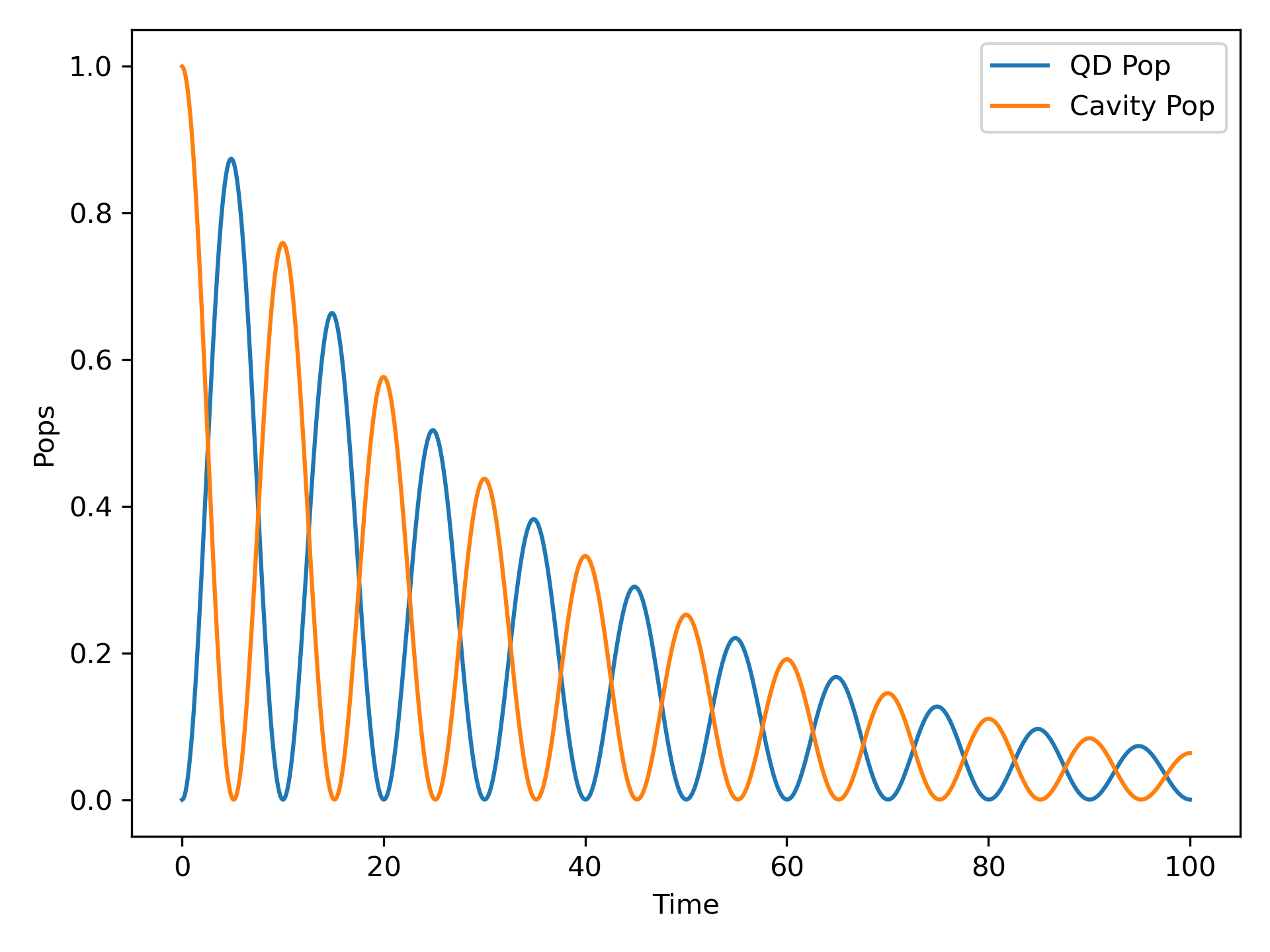
The environmental variables PETSC_DIR, PETSC_ARCH, and SLEPC_DIR will need to be added to your profile (such as ~/.bashrc file) so that they are automatically loaded whenever you start a new terminal.

Read on GitHub

Activity

Latest release

—

Watchers

6

Python support

—

Learn digest

Get monthly updates when library entries change.

Monthly digest: new library entries, updated flagships, and one editorial pick.

Related resources

Keep exploring nearby tools.

cda-tum

mqt-ddsim

MQT DDSIM - A quantum circuit simulator based on decision diagrams written in C++

C++MIT

160 stars · Updated 3mo ago

qosf

os_quantum_software

Curated list of open-source quantum software projects.

CC0-1.0

2,105 stars · Updated 4mo ago

BBN-Q

PySimulator

Python with C++ Backend Simulator for Superconducting Circuits QIP

PythonApache-2.0

8 stars · Updated 12y ago

QISKit

qiskit-tutorial

A collection of Jupyter notebooks showing how to use the Qiskit SDK

Jupyter NotebookApache-2.0Archive

2,522 stars · Updated 3y ago

aniabrown

QuEST

A multithreaded, distributed, GPU-accelerated simulator of quantum computers

C++MITArchive

473 stars · Updated 3mo ago

adamisntdead

QuSimPy

A Multi-Qubit Ideal Quantum Computer Simulator

PythonAGPL-3.0

724 stars · Updated 5y ago